
IT consultant software
for support plans, time and billing
Monthly support plans billed by hand, hours scribbled on a sticky note, and a client's router password somewhere in an old email. AysOps handles the billing, the hours and the logins in one place.
From $19.99 USD$24.99 CAD/mo · No credit card to start
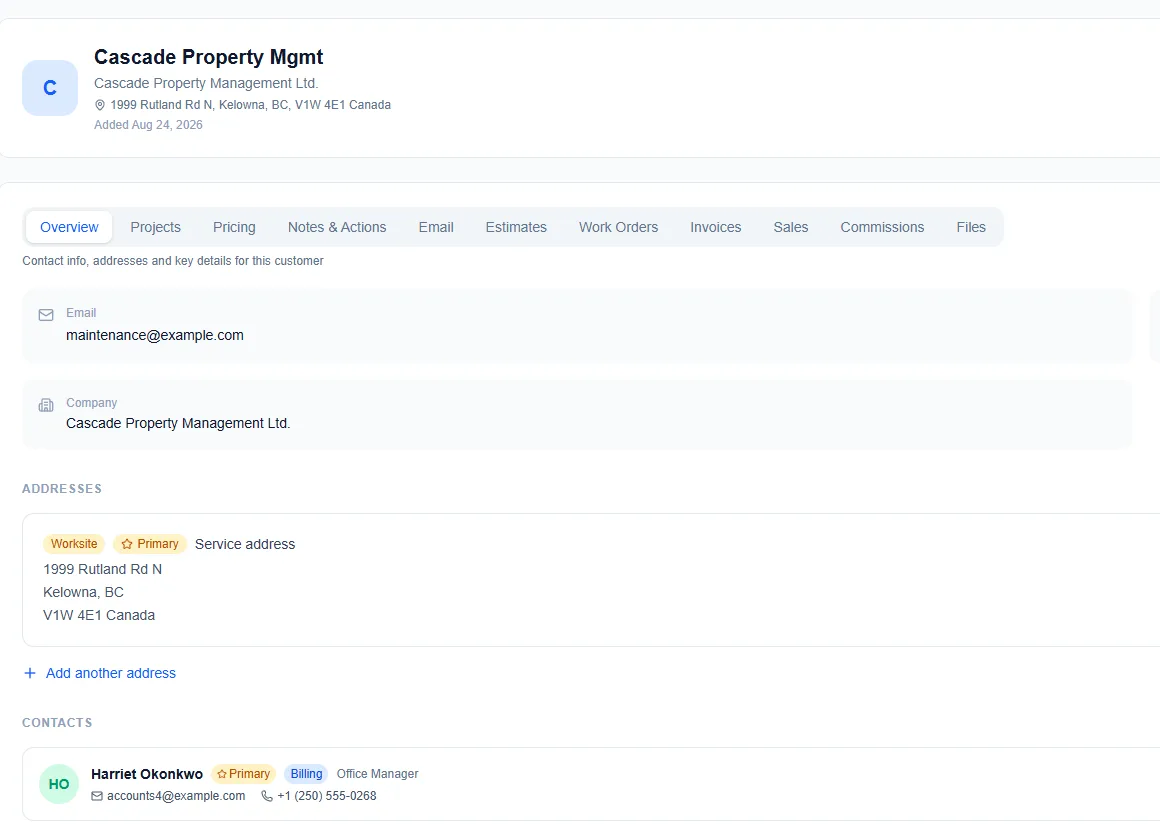
Every client, their plan and their history in one place
Everything below is included in the base plan unless it names an add-on.
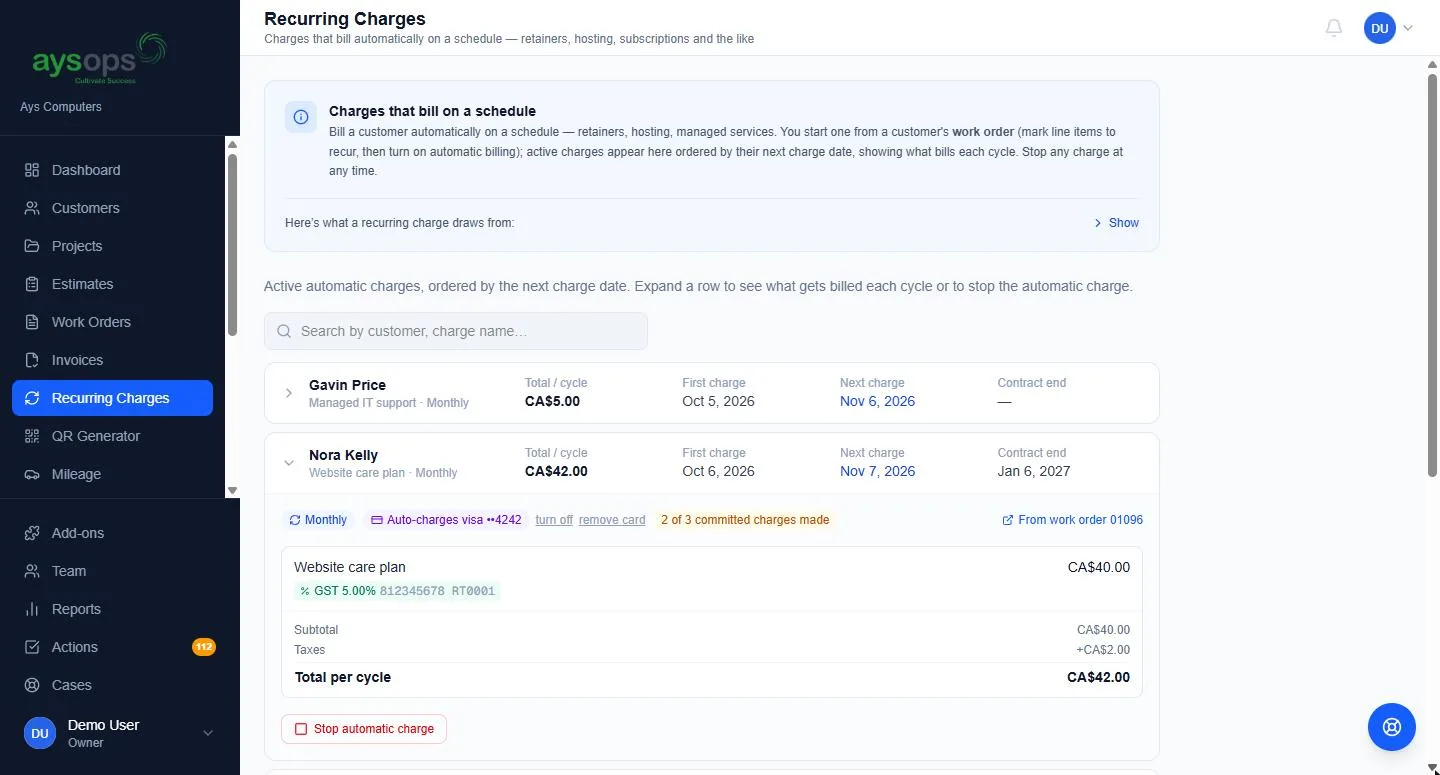
Monthly support plans that bill themselves
Set up monitoring, managed support or hosting as a recurring charge. AysOps creates each invoice on its due date and can email it for you.
- Monthly, quarterly, yearly, or every so many days
- A minimum commitment in billing cycles, with the contract end shown on the Recurring Charges page
- Autopay with the AysOps Payments add-on: the client agrees once, their card is saved, and each cycle is charged. Their email says which card and what date; a decline sends the ordinary pay link
- Sell a plan from your own website with a Buy now button; plans are bought with autopay
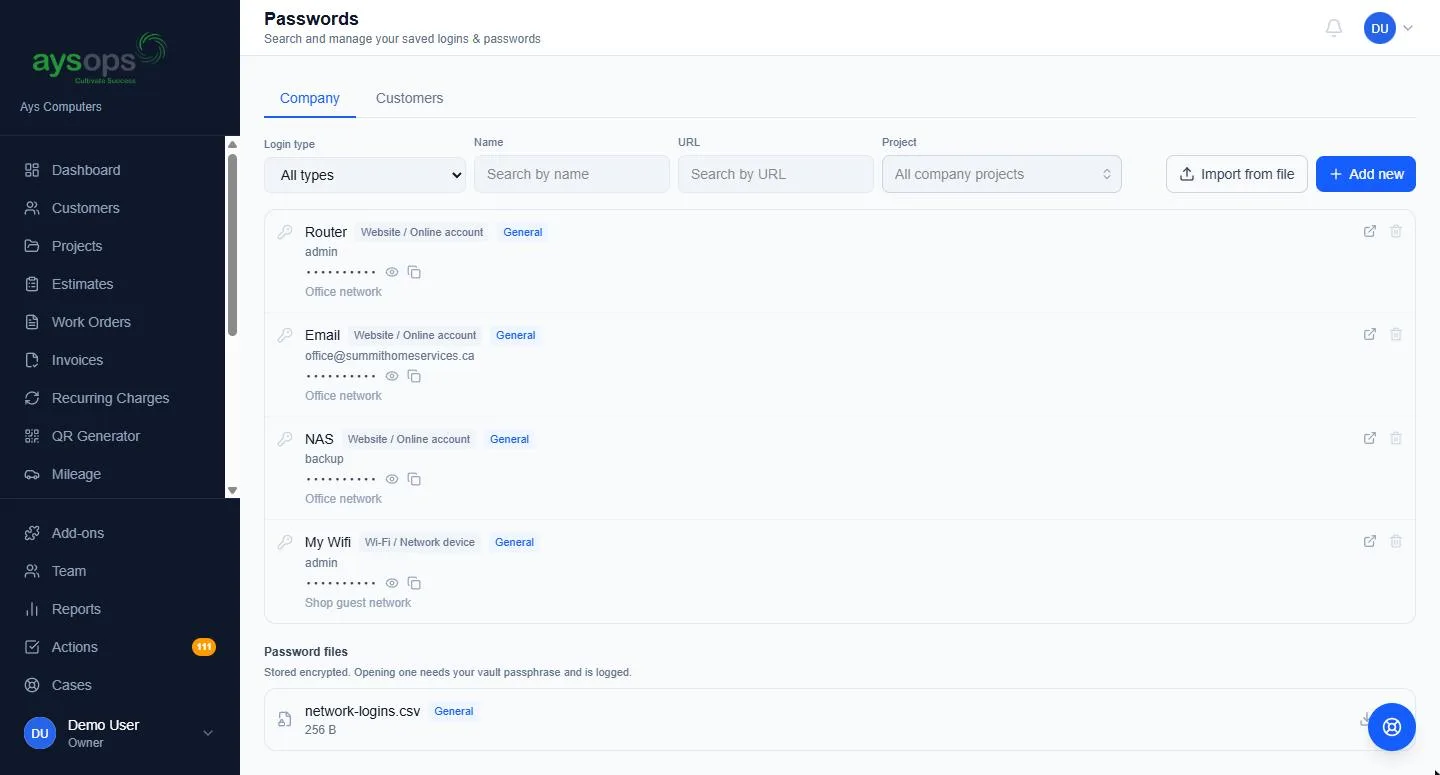
Every client's logins, on their record
With the AysOps Password Vault add-on ($1.99 USD/mo$1.99 CAD/mo):
- File each credential against the customer, a project, or your own business
- More than passwords: Wi-Fi and router logins, licence keys, PINs, recovery codes and secure notes
- Encrypted at rest (AES-256), and revealing anything asks for your personal vault passphrase
- Two separate vaults: your own business logins stay owner- and admin-only, while customer logins can be opened to a tech with one switch
- An access log of who viewed or changed what, a strong-password generator, and import from another password manager's export
Hours tracked where the work happens
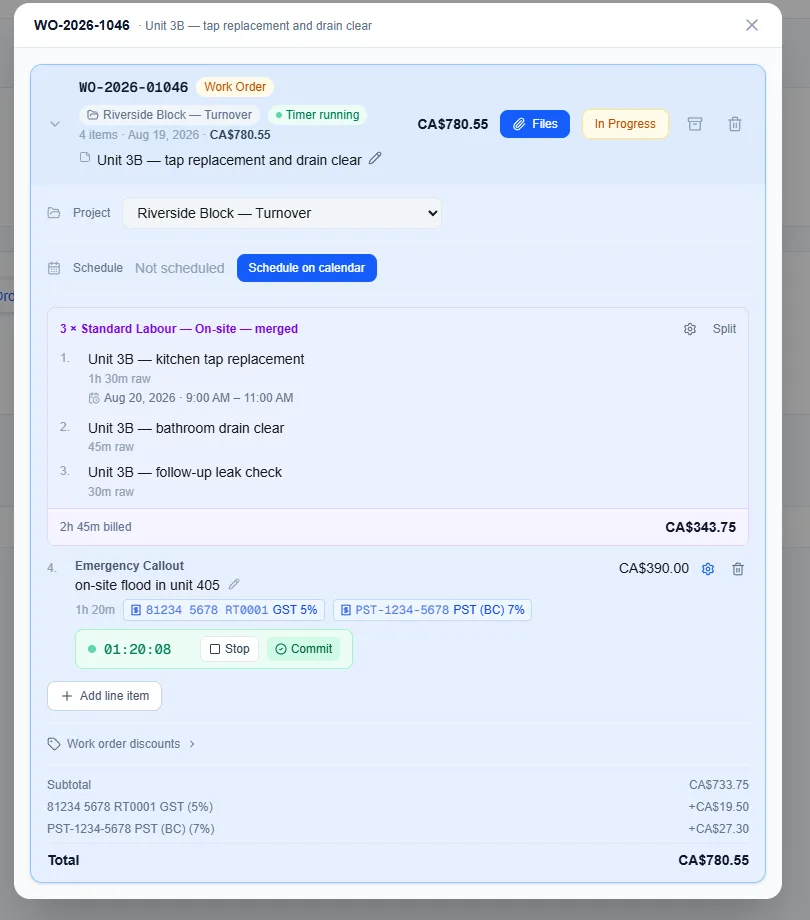
Start a timer on the work order when the call starts, or type the hours in afterwards. The date and hours carry onto the invoice and the receipt.
- Merge several entries on the same rate so the client's copy prints as one line
- Separate rates for remote, on-site and at your location
- Remote appointments on the work calendar, with a Zoom, Google Meet or Microsoft Teams link created as you book (Video Meetings add-ons)
- Project work tracked under customer projects, and your own internal work under company projects billed to nobody
Client calls turned into next steps and quotes
Scoping a project on a video call? Keep what was said on the client's record, then let AysOps AI ($9.99 USD/mo$13.49 CAD/mo) do the write-up.
- After a Zoom, Google Meet or Microsoft Teams call where transcription was on, press one button to save the text transcript onto the customer (Video Meetings add-ons). Text only, never audio or video, and nothing is ever fetched without someone pressing the button. For Teams, your Microsoft 365 administrator approves access once
- No add-on needed to upload a transcript from a meeting recorded on your computer, Otter or any other tool
- Review with AI: a summary and suggested follow-ups, as tasks, emails and phone calls. Tick the ones to keep, each with its own date and owner; nothing is created until you choose
- A draft estimate from the call: AI uses the latest price both sides agreed, turns anything never priced into a question, and shows the words each price came from. An email thread or your own notes work too
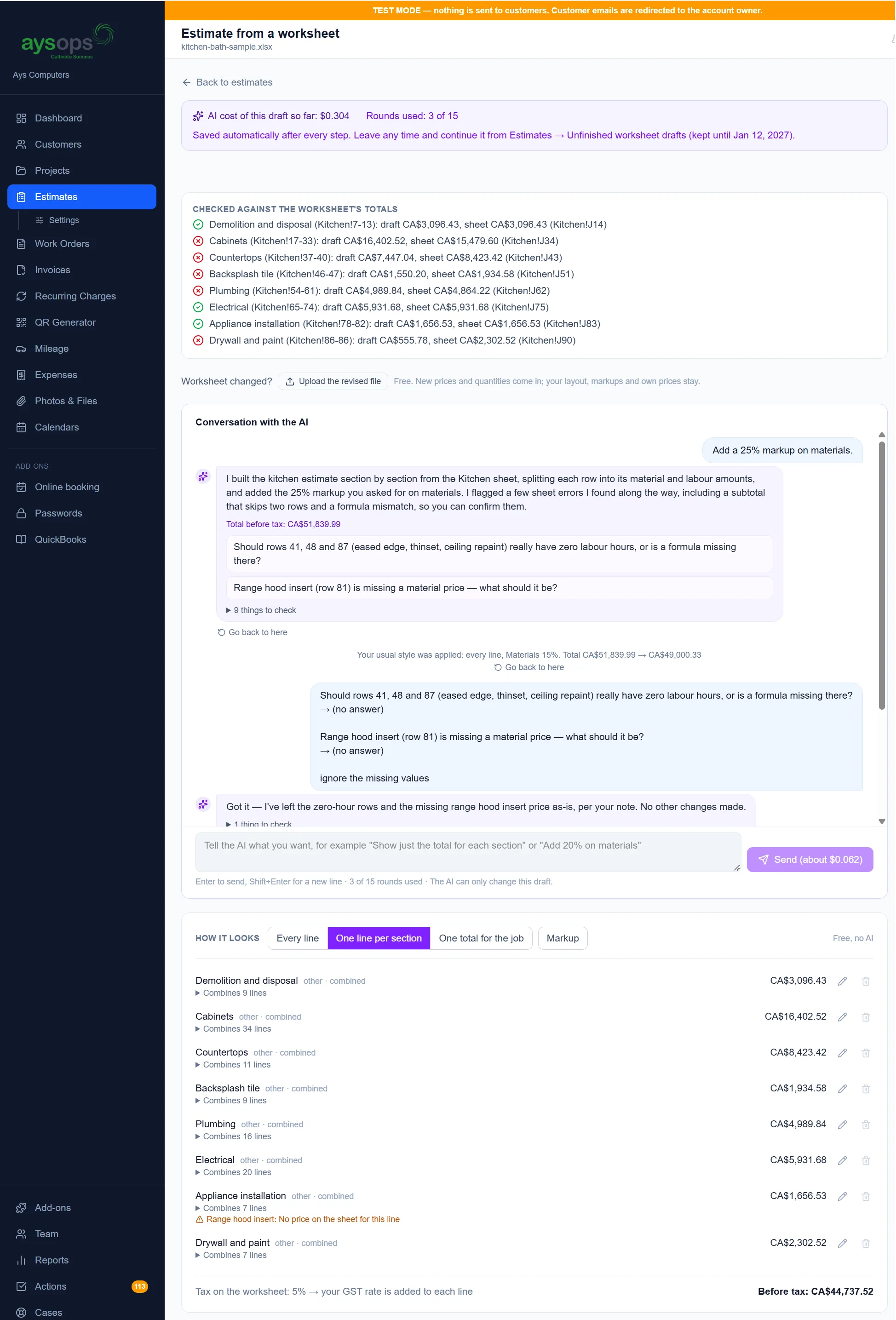
- Or upload your pricing worksheet (Excel, CSV or Word), such as a hardware refresh, and AI drafts the lines and sections. A free check for worksheet mistakes runs before any AI, and every price is read from your file
From signed plan to paid invoice
Sign
A new client agrees to your support contract online, and the monthly plan starts with its first invoice.
Onboard
Their router, Wi-Fi and admin logins go in the vault, on their record.
Support
Extra work outside the plan goes on a work order with a timer, remote or on site.
Bill
The plan invoice goes out on its date, autopay charges the card, and your books update overnight.
Add only what you need
Bought once for the business, never per person. Free while your 90-day trial runs. Canadian businesses see CAD prices.
- Base plan$19.99 USD/mo$24.99 CAD/mo
- Password Vault$1.99 USD/mo$1.99 CAD/mo
- QuickBooks Sync$7.49 USD/mo$9.99 CAD/mo
- Customer Portal$3.99 USD/mo$5.49 CAD/mo
- Calendar Sync$2.49 USD/mo$2.49 CAD/mo
- AysOps PaymentsPer-payment fee
Calendar Sync is included so bookings land in your Google, Microsoft 365 or Apple calendar.
Online payments add a small per-payment fee instead of a monthly price.
- Base plan$19.99 USD/mo$24.99 CAD/mo
- Password Vault$1.99 USD/mo$1.99 CAD/mo
- QuickBooks Sync$7.49 USD/mo$9.99 CAD/mo
- Customer Portal$3.99 USD/mo$5.49 CAD/mo
- Calendar Sync$2.49 USD/mo$2.49 CAD/mo
- AysOps Teams$6.99 USD/mo$8.99 CAD/mo
- One Staff seat$6.99 USD/mo$8.99 CAD/mo
- AysOps PaymentsPer-payment fee
Calendar Sync is included so bookings land in your Google, Microsoft 365 or Apple calendar.
Each person you add costs AysOps Teams once plus their own seat; the seat price depends on their licence.
Online payments add a small per-payment fee instead of a monthly price.
Questions IT consultants ask
Can I bill managed support every month automatically?
Yes. A recurring charge creates the invoice on each due date and can email it. With the AysOps Payments add-on the client can agree to autopay, so their saved card is charged each cycle.
Is it safe to keep client passwords in AysOps?
The Password Vault add-on encrypts every credential at rest (AES-256), asks for your personal vault passphrase before revealing anything, and keeps a log of who viewed or changed what. Your own business logins sit in a separate vault that only owners and admins can open.
Can AysOps turn a client call into a to-do list?
Yes, with AysOps AI. Save the call's text transcript onto the customer with one press after a Zoom, Google Meet or Microsoft Teams call where transcription was on (with a Video Meetings add-on), or upload one from any tool. Review with AI writes a summary and suggests tasks, emails and phone calls; you tick the ones to keep. AysOps never records audio or video, and never fetches a transcript unless someone presses the button.
Does it work with QuickBooks Online?
Yes, with the QuickBooks Sync add-on. It imports your tax codes, customers, vendors and items, then sends invoices, payments, estimates and expenses every night. It works for Canadian and US QuickBooks companies.
Can I bill clients in Canadian and US dollars?
Yes. Each customer has a default currency, each document is in one currency, and reports never add the two together. You set up your own tax rates, such as GST and PST.
See it with your own clients in mind
Click around the live demo, or check what it would cost. $19.99 USD$24.99 CAD/month for the base plan, 90 days free.